
You find out late
Something stopped working hours ago. You noticed when you tried to use it.
For homelabs and self-hosters
Ops Intel connects to your UniFi gear and your Linux boxes, digs into what actually went wrong, and proposes a fix for you to approve. Then it writes the whole thing down — so the next time it happens, the answer is already there.
Outbound only — nothing exposed to the internet. Card required, nothing charged for 14 days, then $29/mo. Cancel any time.
The annoying part
Nothing in a homelab breaks conveniently. It breaks on a Sunday night, or while you're away, or six months after you last thought about it.
Something stopped working hours ago. You noticed when you tried to use it.
You know you have. You just can't remember what the fix was, and you didn't write it down.
It was in a browser tab you closed, a Discord you left, or a forum thread that's now 404.
What it connects to
Your UDM, switches and access points through UniFi Network, plus cameras through Protect.
Docker hosts, NAS boxes, VMs, Pis, your Proxmox nodes. If you can SSH into it, so can Ops Intel.
For the bits that aren't at home. EC2, S3, RDS, security groups and IAM.
You run a small agent on your network and it dials out to us. Nothing needs a port open, and there's no VPN to set up.
Running something we don't cover yet? Tell us what you'd want connected — what people ask for is how we decide which connector gets built next.
See it work
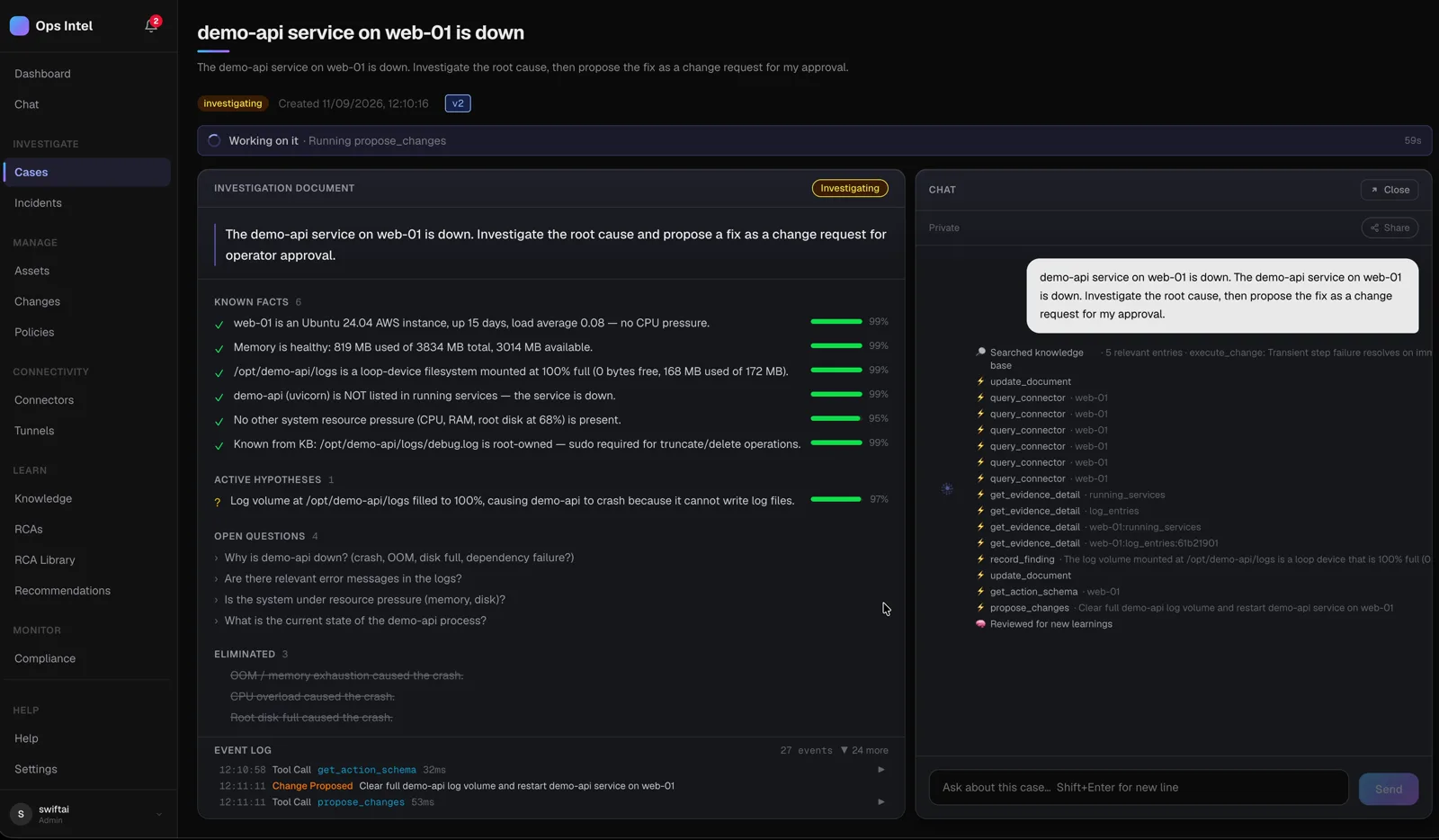
A real investigation on a real server — from “it's broken” to a fix you approved and an answer you keep.
Step 01
Start
In plain language. No runbook, no query syntax, nothing new to learn.
Step 02
Investigate
It logs into the box itself and checks the service, the logs, the disk — the same things you would.
Step 03
Work it out
Everything it finds is scored by confidence, so you can see the reasoning instead of taking its word for it.
Step 04
Propose
Every step, the exact command, which box it runs on, and how to undo it. Nothing happens on its own.
Step 05
Approve
It runs the steps in order and confirms the thing is actually back up before calling it done.
Step 06
Remember
It writes up what broke, why, and what fixed it. Searchable, so the answer is there in six months when it happens again.
Price
That's the Personal plan — one person, your own gear, everything on this page. There are bigger plans for teams, but you probably don't need one.
Enough for your UniFi controller, a couple of Linux boxes and a cloud account.
Roughly a few investigations a week, and your usage is shown in the app.
Try it on your own gear first. Card required, nothing charged until day 14, and cancelling before then costs you nothing.
The obvious questions
Yes — 14 days, on your own gear. We ask for a card so it rolls straight into a subscription, but nothing is charged until day 14 and cancelling before then costs you nothing. The trial has a capped AI budget: enough for a few complete investigations, which is what it takes to know whether this is any use to you. Every investigation spends real money on AI tokens, so the cap is what makes a free trial possible at all.
No. You run a small agent on your network and it dials out to us. Nothing listens on the internet, and there's no VPN or port forward to configure.
No. It proposes, you approve. You see every command before it runs, on which host, with a rollback plan — and it's all logged.
Today: UniFi Network, UniFi Protect, AWS, and anything you can reach over SSH — which covers most Linux boxes, including Proxmox and Docker hosts. A dedicated Proxmox connector is being built now. Ask for the one you want and it goes on the list.
Free for 14 days on your own gear. Then $29 a month, cancel any time.
Start 14-day free trial